Skip to content

Apple Support Specialist

Madison Area | 608-389-3226

Toggle menu
  • Home
  • Business
  • Blog
  • Reviews
  • Contact

How to Type Special Characters and Symbols

By adminNovember 3, 2014mac, operating systems, tips & tricks

To type specific characters and symbols (e.g. Á), use the Character Viewer. Choose Edit > Special Characters to open the Character Viewer.
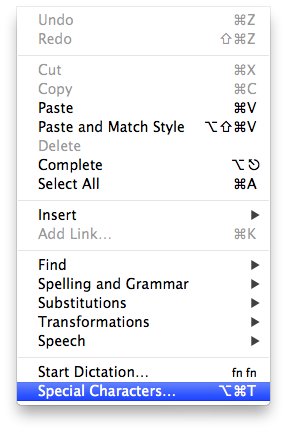
Special Characters Menu

You can also type characters and symbols using keyboard shortcuts. Here’s a list of those shortcuts.

For more information, visit the Apple Support page.

Post navigation

Control YouTube With Your Smartphone
How to Send a Link

Contact

25% Off First Hour (On-site or Remote)

Email:
tom@pcrepairathome.com

Phone:
608-389-3226

Links:
Google Reviews, Map

Location (Drop-off):
464 N Sherman Ave.
Madison, WI 53704

Hours:
Monday-Friday
8:00am–5:00pm

Search

© 2026 Apple Support Specialist. Proudly powered by Sydney